RunPack
The score
Why does my score say “Building baseline”?
RunPack compares you with your own normal, so it needs about three weeks of history. It reads up to 90 days from Apple Health when you first open it, so most people get a score straight away.
Why do I see a band instead of a number?
Your device isn’t sharing some signals — most often heart rate variability (Garmin and WHOOP don’t write it to Apple Health). RunPack shows a band rather than a precise-looking number built from too little data.
Why is my score different from my watch’s own score?
Each company weighs signals differently. RunPack compares you only with your own recent baseline and explains every input under “How this is calculated”.
Devices
Do I need an Apple Watch?
No. With just your iPhone you record runs with GPS and do a 10-second morning check-in — hours slept, sleep quality, energy and soreness — for a check-in score against your own normal. Anything that writes to Apple Health adds more: Apple Watch gives the full measured 0–100 score; Garmin, WHOOP and Oura add sleep and heart data.
Can I record runs with my phone?
Yes. The Run tab records with your iPhone’s GPS, keeps going with the screen locked, shows distance and pace on the Lock Screen, and saves the run to Apple Health. Runs from your watch show up too.
I wear two devices. Does that double-count?
No. RunPack takes each signal from one device per night or per run, so two recordings of the same sleep or workout count once.
Crews
How many people can be in a crew?
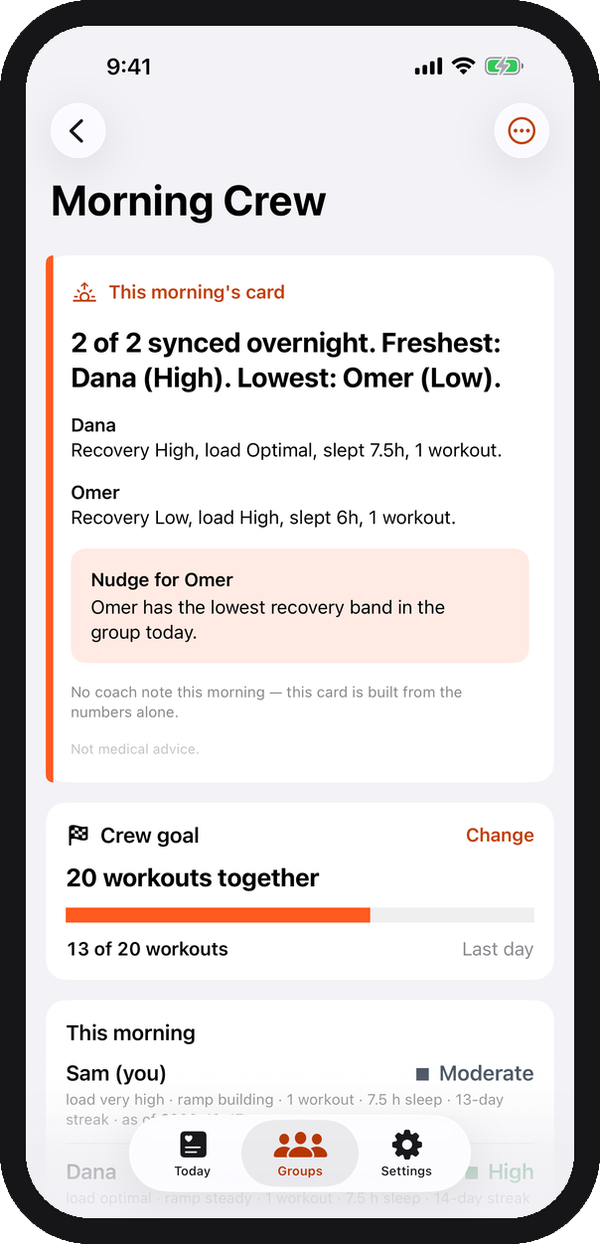
Up to 4 for free, up to 30 with RunPack Plus. You can be in up to five crews.
What do my friends see?
Coarse bands — recovery band, training load and ramp, number of workouts, and sleep to the nearest half hour. Never your score, heart rate variability, resting heart rate, email or Apple ID.
If you turn on run sharing, your runs too: route, distance, time, pace and any photos you add — never heart rate. You can hide or delete any run.
What if someone posts something they shouldn’t?
Report the run or photo from its menu — it disappears for you straight away and we review every report within 24 hours. You can also block someone: you stop seeing each other’s runs and reactions in every crew.
How do crew goals work?
The crew’s owner picks one goal for the week (Monday to Sunday): everyone checks in every day, 10–30 workouts together, or everyone averages 7 hours of sleep. Progress updates each morning.
Privacy
Does my health data leave my phone?
Your raw Health records stay on your phone. If you sign in, a short daily summary is uploaded so your crew’s board works and your history survives a new phone. Runs — route, distance, time and pace — are uploaded only if you turn on run sharing.
Do you use AI?
Only if you turn it on. With AI coaching on, a short summary of your day — hours slept, your recovery score, how many workouts and heart-rate averages — goes to Google’s Gemini API to write the crew’s morning card. Your raw Health records never do. Turn it off any time in Settings; everything else keeps working.
How do I delete my account?
Settings → Account → Delete account. Everything RunPack’s server holds about you is deleted; your crews carry on without you.
App
Is there a widget and an Apple Watch app?
Yes — home and lock screen widgets, an Apple Watch app with complications, and Siri: “What’s my recovery in RunPack?”
How much does RunPack cost?
RunPack is free for you and crews of up to 4. RunPack Plus — $4.99 a month or $39.99 a year — is paid by one person and covers everyone in crews they own: up to 30 people, route maps, photos on runs and crew goals. Cancel any time in your Apple ID settings.
Your crew’s mornings start here.
Start a crew with the people you train with. Works with just your iPhone — free to start, with Apple Watch and widgets too.
Coming soon to theApp Store